
# dubbo provider 添加熔断器
在 Application 中增加@EnableHystrix注解
package com.funtl.hello.dubbo.service.user.provider;

import com.alibaba.dubbo.container.Main;
import org.springframework.boot.SpringApplication;
import org.springframework.boot.autoconfigure.SpringBootApplication;
import org.springframework.cloud.netflix.hystrix.EnableHystrix;

@EnableHystrix
@SpringBootApplication
public class HelloDubboServiceUserProviderApplication {
    public static void main(String[] args) {
        SpringApplication.run(HelloDubboServiceUserProviderApplication.class, args);
        Main.main(args);
    }
}
在 Service 中增加@HystrixCommand注解
在调用方法上增加@HystrixCommand配置,此时调用会经过 Hystrix 代理
//日志记录
private static final Logger log = LoggerFactory.getLogger(LogRecordServiceImpl.class);

/**
 *  测试熔断器
 */
@HystrixCommand(commandProperties = {
        @HystrixProperty(name = "circuitBreaker.requestVolumeThreshold", value = "10"),
        @HystrixProperty(name = "execution.isolation.thread.timeoutInMilliseconds", value = "2000")
}, fallbackMethod = "helloHystrixFallback")
@Override
public String helloHystrix(String name) {

    if(StringUtils.isBlank(name)) {
         throw new RuntimeException("Exception to show hystrix enabled.");
    }

    log.debug("name:{}" , name);
    return "hello , " + name;
}

public String helloHystrixFallback(String name) {
    return "Hystrix fallback , " + name;
}
测试熔断器
@Autowired
private ILogRecordService logRecordService ;

@PerfTest(invocations = 10000 , threads = 100) // 并发测试
@Test
public void testHelloHystrix() {
    String name = null ; // "zhangnsan" ;

    String hello = logRecordService.helloHystrix(name) ;
    log.debug(hello);
}
打开 Hystrix 熔断器仪表盘
在 Application 中增加 @EnableHystrixDashboard 注解
@EnableHystrix
@EnableHystrixDashboard
@SpringBootApplication
public class HelloDubboServiceUserConsumerApplication {
    public static void main(String[] args) {
        SpringApplication.run(HelloDubboServiceUserConsumerApplication.class, args);
    }
}
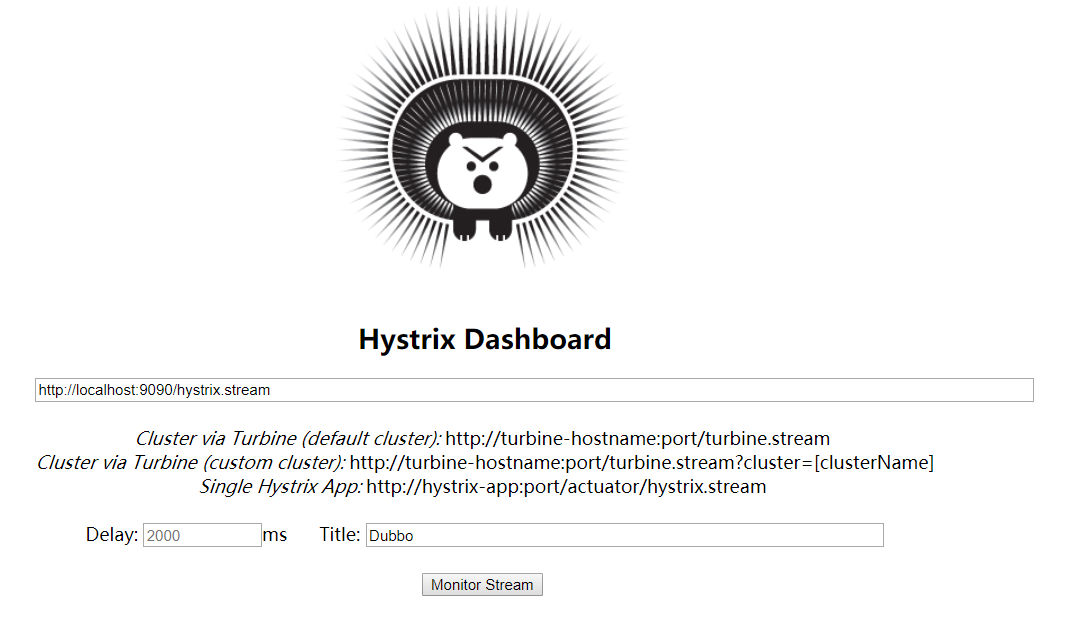
测试 Hystrix Dashboard , 浏览器端访问 http://localhost:9090/hystrix 界面如下:
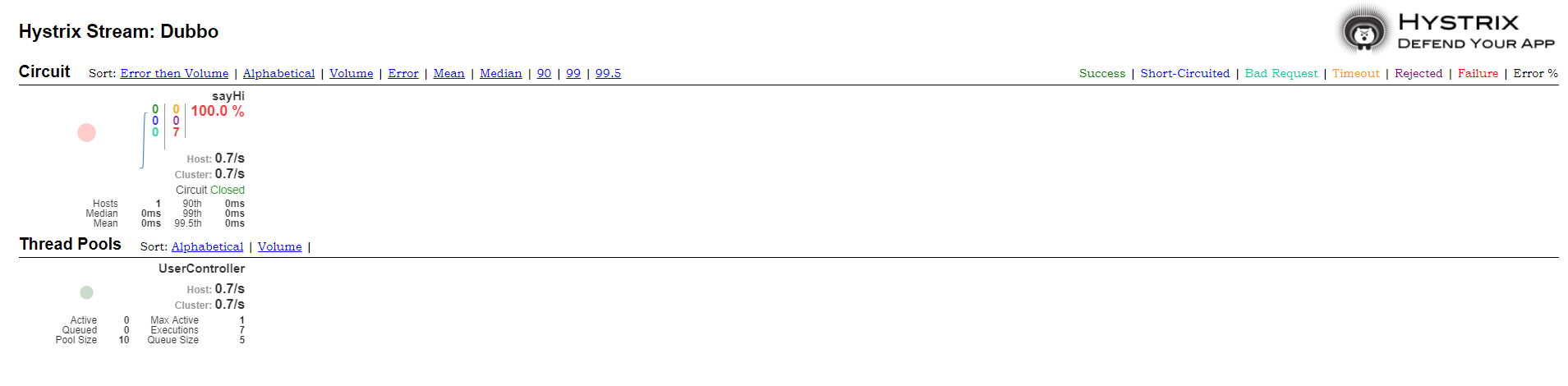
在异常出错的时候,会显示如下信息
参数说明
hystrix.command.default 和 hystrix.threadpool.default 中的 default 为默认 CommandKey
# Command Properties
Execution 相关的属性的配置:
| 参数 | 描述 |
|---|---|
| hystrix.command.default.execution.isolation.strategy | 隔离策略,默认是 Thread, 可选 Thread/Semaphore |
| hystrix.command.default.execution.isolation.thread.timeoutInMilliseconds | 命令执行超时时间,默认 1000ms |
| hystrix.command.default.execution.timeout.enabled | 执行是否启用超时,默认启用 true |
| hystrix.command.default.execution.isolation.thread.interruptOnTimeout | 发生超时是是否中断,默认 true |
| hystrix.command.default.execution.isolation.semaphore.maxConcurrentRequests | 最大并发请求数,默认 10,该参数当使用 ExecutionIsolationStrategy.SEMAPHORE 策略时才有效。如果达到最大并发请求数,请求会被拒绝。理论上选择 semaphore size 的原则和选择 thread size 一致,但选用 semaphore 时每次执行的单元要比较小且执行速度快(ms 级别),否则的话应该用 thread。 |
semaphore 应该占整个容器(tomcat)的线程池的一小部分。
# Fallback 相关的属性
这些参数可以应用于 Hystrix 的 THREAD 和 SEMAPHORE 策略
| 参数 | 描述 |
|---|---|
| hystrix.command.default.fallback.isolation.semaphore.maxConcurrentRequests | 如果并发数达到该设置值,请求会被拒绝和抛出异常并且 fallback 不会被调用。默认 10 |
| hystrix.command.default.fallback.enabled | 当执行失败或者请求被拒绝,是否会尝试调用 hystrixCommand.getFallback() 。默认 true |
# Circuit Breaker 相关的属性
| 参数 | 描述 |
|---|---|
| hystrix.command.default.circuitBreaker.enabled | 用来跟踪 circuit 的健康性,如果未达标则让 request 短路。默认 true |
| hystrix.command.default.circuitBreaker.requestVolumeThreshold | 一个 rolling window 内最小的请求数。如果设为 20,那么当一个 rolling window 的时间内(比如说 1 个 rolling window 是 10 秒)收到 19 个请求,即使 19 个请求都失败,也不会触发 circuit break。默认 20 |
| hystrix.command.default.circuitBreaker.sleepWindowInMilliseconds | 触发短路的时间值,当该值设为 5000 时,则当触发 circuit break 后的 5000 毫秒内都会拒绝 request,也就是 5000 毫秒后才会关闭 circuit。默认 5000 |
| hystrix.command.default.circuitBreaker.errorThresholdPercentage | 错误比率阀值,如果错误率>=该值,circuit 会被打开,并短路所有请求触发 fallback。默认 50 |
| hystrix.command.default.circuitBreaker.forceOpen | 强制打开熔断器,如果打开这个开关,那么拒绝所有 request,默认 false |
| hystrix.command.default.circuitBreaker.forceClosed | 强制关闭熔断器 如果这个开关打开,circuit 将一直关闭且忽略 circuitBreaker.errorThresholdPercentage |
# Metrics 相关参数
| 参数 | 描述 |
|---|---|
| hystrix.command.default.metrics.rollingStats.timeInMilliseconds | 设置统计的时间窗口值的,毫秒值,circuit break 的打开会根据 1 个 rolling window 的统计来计算。若 rolling window 被设为 10000 毫秒,则 rolling window 会被分成 n 个 buckets,每个 bucket 包含 success,failure,timeout,rejection 的次数的统计信息。默认 10000 |
| hystrix.command.default.metrics.rollingStats.numBuckets | 设置一个 rolling window 被划分的数量,若 numBuckets = 10,rolling window = 10000,那么一个 bucket 的时间即 1 秒。必须符合 rolling window % numberBuckets == 0。默认 10 |
| hystrix.command.default.metrics.rollingPercentile.enabled | 执行时是否 enable 指标的计算和跟踪,默认 true |
| hystrix.command.default.metrics.rollingPercentile.timeInMilliseconds | 设置 rolling percentile window 的时间,默认 60000 |
| hystrix.command.default.metrics.rollingPercentile.numBuckets | 设置 rolling percentile window 的 numberBuckets。逻辑同上。默认 6 |
| hystrix.command.default.metrics.rollingPercentile.bucketSize | 如果 bucket size = 100,window = 10s,若这 10s 里有 500 次执行,只有最后 100 次执行会被统计到 bucket 里去。增加该值会增加内存开销以及排序的开销。默认 100 |
| hystrix.command.default.metrics.healthSnapshot.intervalInMilliseconds | 记录 health 快照(用来统计成功和错误绿)的间隔,默认 500ms |
# Request Context 相关参数
| 参数 | 描述 |
|---|---|
| hystrix.command.default.requestCache.enabled | 默认 true,需要重载 getCacheKey(),返回 null 时不缓存 |
| hystrix.command.default.requestLog.enabled | 记录日志到 HystrixRequestLog,默认 true |
# Collapser Properties 相关参数
| 参数 | 描述 |
|---|---|
| hystrix.collapser.default.maxRequestsInBatch | 单次批处理的最大请求数,达到该数量触发批处理,默认 Integer.MAX_VALUE |
| hystrix.collapser.default.timerDelayInMilliseconds | 触发批处理的延迟,也可以为创建批处理的时间+该值,默认 10 |
| hystrix.collapser.default.requestCache.enabled | 是否对 HystrixCollapser.execute() and HystrixCollapser.queue()的 cache,默认 true |
# ThreadPool 相关参数
线程数默认值 10 适用于大部分情况(有时可以设置得更小),如果需要设置得更大,那有个基本得公式可以 follow: requests per second at peak when healthy × 99th percentile latency in seconds + some breathing room 每秒最大支撑的请求数 (99%平均响应时间 + 缓存值) 比如:每秒能处理 1000 个请求,99%的请求响应时间是 60ms,那么公式是: (0.060+0.012)
基本得原则时保持线程池尽可能小,他主要是为了释放压力,防止资源被阻塞。 当一切都是正常的时候,线程池一般仅会有 1 到 2 个线程激活来提供服务
| 参数 | 描述 |
|---|---|
| hystrix.threadpool.default.coreSize | 并发执行的最大线程数,默认 10 |
| hystrix.threadpool.default.maxQueueSize | BlockingQueue 的最大队列数,当设为-1,会使用 SynchronousQueue,值为正时使用 LinkedBlcokingQueue。该设置只会在初始化时有效,之后不能修改 threadpool 的 queue size,除非 reinitialising thread executor。默认-1。 |
| hystrix.threadpool.default.queueSizeRejectionThreshold | 即使 maxQueueSize 没有达到,达到 queueSizeRejectionThreshold 该值后,请求也会被拒绝。因为 maxQueueSize 不能被动态修改,这个参数将允许我们动态设置该值。if maxQueueSize == -1,该字段将不起作用 |
| hystrix.threadpool.default.keepAliveTimeMinutes | 如果 corePoolSize 和 maxPoolSize 设成一样(默认实现)该设置无效。如果通过 plugin(https://github.com/Netflix/Hystrix/wiki/Plugins)使用自定义实现,该设置才有用,默认1. |
| hystrix.threadpool.default.metrics.rollingStats.timeInMilliseconds | 线程池统计指标的时间,默认 10000 |
| hystrix.threadpool.default.metrics.rollingStats.numBuckets | 将 rolling window 划分为 n 个 buckets,默认 10 |